Understanding Leads
Quick Reference
A lead is a potential client who's shown interest in your photography services. Leads are the starting point of your client journey in ShootPath.
Leads Interface:
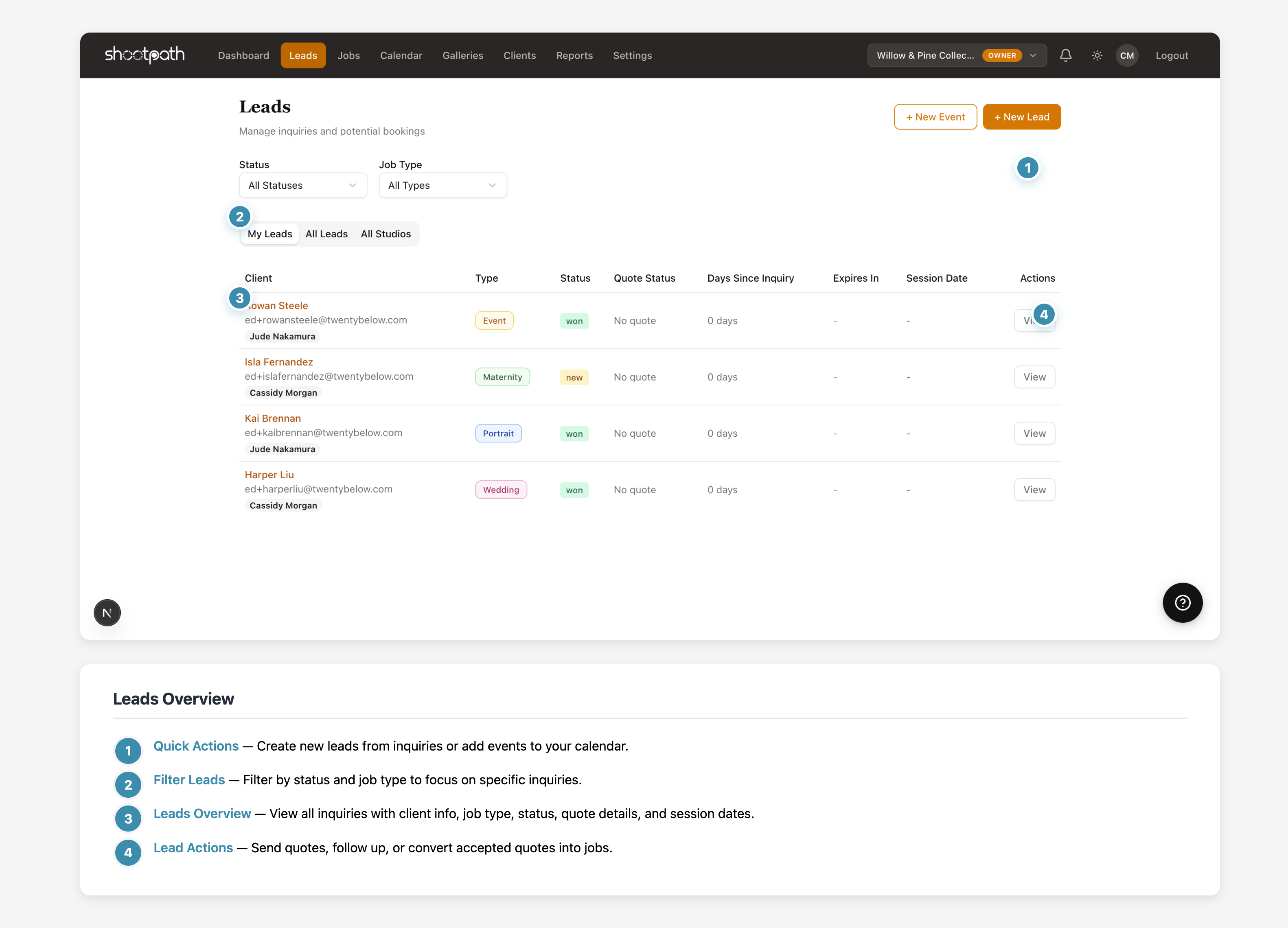
- Quick Actions - Create new leads or add calendar events
- Filter Leads - Filter by status and job type
- Leads Overview - View all inquiries with client info, status, and dates
- Lead Actions - Send quotes, follow up, or convert to jobs
What is a Lead?
- Someone who filled out your contact form
- A referral from a past client
- Anyone who inquired about your services via email, DM, or phone
- The first step before sending a quote or booking a job
Lead Lifecycle:
- New - Just created, no quote sent yet
- Quoted - You've sent them pricing
- Won - They accepted and booked! (converts to a Job)
- Lost - They went with another photographer or declined
Why Leads Matter:
- Track every inquiry so nothing slips through the cracks
- See which marketing channels bring the most inquiries
- Follow up at the right time to convert more bookings
- Understand your conversion rate (leads → bookings)
Next Steps: Create your first lead or learn about sending quotes.
Detailed Guide
What Exactly is a Lead?
Think of a lead as a "warm" potential client - someone who's expressed interest but hasn't committed yet. They're different from cold prospects (random people who might someday need a photographer) because they've taken an action: they reached out to you!
In ShootPath, every client relationship starts as a lead. Even if someone calls and books immediately, you'll still create a lead first, then convert it to a job. This creates a complete record of your entire client journey.
Examples of leads:
- Emma fills out your website contact form asking about senior portraits
- Your friend Sarah refers her coworker Mike who needs a wedding photographer
- Someone DMs you on Instagram: "How much for family photos?"
- A potential client emails: "Are you available June 15th for our wedding?"
All of these are leads! Each one gets tracked in ShootPath so you can follow up appropriately and (hopefully) convert them into paying clients.
The Lead Lifecycle
Leads move through several stages as you work with them. Understanding this lifecycle helps you know exactly where each potential client stands and what to do next.
Stage 1: New Lead
This is when you first create the lead in ShootPath. The client has expressed interest, but you haven't sent them pricing yet.
What to do:
- Respond quickly (within 24-48 hours is ideal!)
- Ask qualifying questions (budget, timeline, vision)
- Gather key details (session type, date, location)
- Build rapport and show enthusiasm
Pro tip: The faster you respond to a new lead, the more likely you are to book them. They're probably reaching out to multiple photographers, so speed matters!
Stage 2: Quoted
You've sent the client a quote with your pricing and packages. Now the ball is in their court - they're reviewing it and deciding whether to book.
What to do:
- Give them time to review (don't follow up immediately!)
- Wait 3-5 days, then send a friendly check-in
- Answer any questions they have about packages or pricing
- Offer to jump on a quick call if they're undecided
Common questions clients have at this stage:
- "Can we customize the package?" (Usually yes!)
- "When do we need to decide?" (Check your quote expiration date)
- "What's your cancellation policy?" (In your contract)
- "Can we add more hours later?" (Via add-ons)
Most photographers follow up 3-5 days after sending a quote if they haven't heard back. Too soon feels pushy, too late and they might have booked someone else!
Stage 3: Won (Booked!)
The client accepted your quote! 🎉 This is what you've been working toward. When a lead is marked "won," ShootPath automatically:
- Creates a job record
- Generates a contract for signature
- Sets up the payment schedule
- Assigns the appropriate workflow
At this point, the lead has served its purpose - it's now an active job. You'll manage everything else (contract, payments, shoot, delivery) from the job record.
What happens next:
- Client receives contract to sign
- Once signed, they can pay the deposit
- You schedule the session
- Work through your workflow steps
- Deliver the final gallery
Stage 4: Lost
Not every lead converts, and that's okay! A lead is marked "lost" when:
- They tell you they're going with another photographer
- They decide not to book at all
- Your quote expires and they don't respond
- They ghost after receiving the quote
Important: Don't delete lost leads! Keep the record because:
- They might come back later (life changes, they need you for something else)
- They might refer friends to you
- You can analyze why leads are lost (price too high? response time? availability?)
- Historical data helps you improve your conversion rate
You can add notes like "went with another photographer - price was the issue" or "needed a date I wasn't available" to understand patterns over time.
Lead vs. Job: What's the Difference?
This confuses a lot of photographers at first! Here's the simple breakdown:
Lead = Potential client (interested but not committed)
- You're still "selling" them on booking you
- No contract, no payment yet
- They can easily back out
- Your goal: convert them to a booking
Job = Confirmed booking (committed client)
- They've said "yes" and accepted your quote
- Contract signed, deposit paid
- You're now working together
- Your goal: deliver an amazing experience
Think of it like dating vs. being married. A lead is dating - you're getting to know each other, seeing if it's a good fit. A job is married - you're committed to each other and working toward the wedding day (literally, in some cases!).
Managing Multiple Leads
As your business grows, you'll have multiple leads at different stages. Here's how to stay organized:
Use the Leads List
The Leads page shows all your inquiries in one place. You can:
- Filter by status (show me all "quoted" leads)
- Filter by job type (show me all wedding leads)
- Sort by inquiry date (oldest first = needs follow-up!)
- See how many days each quote has been pending
Check Your Dashboard
The "Active Leads" metric on your dashboard shows how many potential clients you're currently working with. This number should always be moving - if it's stagnant, it's time to focus on marketing!
Set Reminders
Don't let leads get cold! If you quoted someone a week ago and haven't heard back, that's your reminder to send a friendly check-in email.
A "stale" lead is one you quoted 2+ weeks ago with no follow-up. At that point, they've likely booked someone else. Follow up consistently to keep leads warm!
Converting Leads to Bookings
Your conversion rate is the percentage of leads that become jobs. Industry average is around 30-50% for photographers, but it varies based on your niche, pricing, and market.
Ways to improve your conversion rate:
1. Respond Fast The first photographer to respond often wins the booking. Set up notifications so you're alerted immediately when a new lead comes in.
2. Qualify Early Don't send a quote to someone who can't afford you or isn't a good fit. Ask about budget and expectations upfront to avoid wasting time on leads that won't convert.
3. Make Your Quotes Attractive
- Clear pricing with no hidden fees
- Beautiful presentation (ShootPath handles this!)
- Easy to understand packages
- Simple next steps ("Click here to accept")
4. Follow Up Strategically
- Day 0: Send the quote
- Day 3-5: "Just checking in! Any questions?"
- Day 7-10: "Your quote expires soon - can I help with anything?"
- Day 14+: "I'd love to work with you! Let me know if you'd like to discuss options."
5. Address Objections If price is an issue, can you offer a smaller package or payment plan? If availability doesn't work, can you suggest an alternative date? Being flexible (within reason) helps close more leads.
Lead Sources: Where Do They Come From?
ShootPath can track where each lead came from, which helps you understand what marketing is working:
- Website contact form - Your most important lead source
- Instagram DM - Social media inquiries
- Referral - Word of mouth from past clients
- Google search - SEO and local search
- Facebook/TikTok - Social media advertising
- Wedding vendors - Venue or planner referrals
- Bridal shows - In-person events
Track this in the lead notes! After 6 months, you might discover "80% of my bookings come from Instagram" or "referrals have the highest conversion rate." That data is gold for focusing your marketing efforts.
Tips for Lead Management
Be Personal Don't send generic templates. Reference specific details from their inquiry: "I love that you're planning an outdoor ceremony at sunset - golden hour photos are my favorite!"
Manage Expectations Be clear about your process, timeline, and what they can expect. Surprises later (like "you only get 20 edited photos") lead to unhappy clients.
Stay Organized Use ShootPath's notes field to track conversation details: "Wants vintage vibe, mentioned Pinterest boards, budget around $2000, flexible on dates."
Know When to Let Go If a lead isn't responding after multiple follow-ups, mark them lost and move on. Your time is better spent on warm leads and paying clients.
Ask for Feedback When a lead says no, politely ask why (if appropriate). "Thanks for considering me! I'm always trying to improve - was there anything specific that led to your decision?" The answers might surprise you.
What's Next?
Now that you understand leads, you're ready to start building your client pipeline!
Ready to create your first lead? Follow the step-by-step guide
Want to learn about sending quotes? Check out the Quotes section (coming soon!)
Curious about what happens after booking? Read Understanding Jobs to see the full workflow
Need to set up your business info first? Start with Basic Settings
Questions? Look for the help links throughout ShootPath, or reach out to support if you need help!